Run and govern APIs from your editor
The KeyRunner extension adds API-aware CodeLens actions above supported requests in Visual Studio Code and Cursor. Developers can move from an API call in application code to a tested KeyRunner request and a governed AI tool without manually recreating the method, URL, headers, or body.
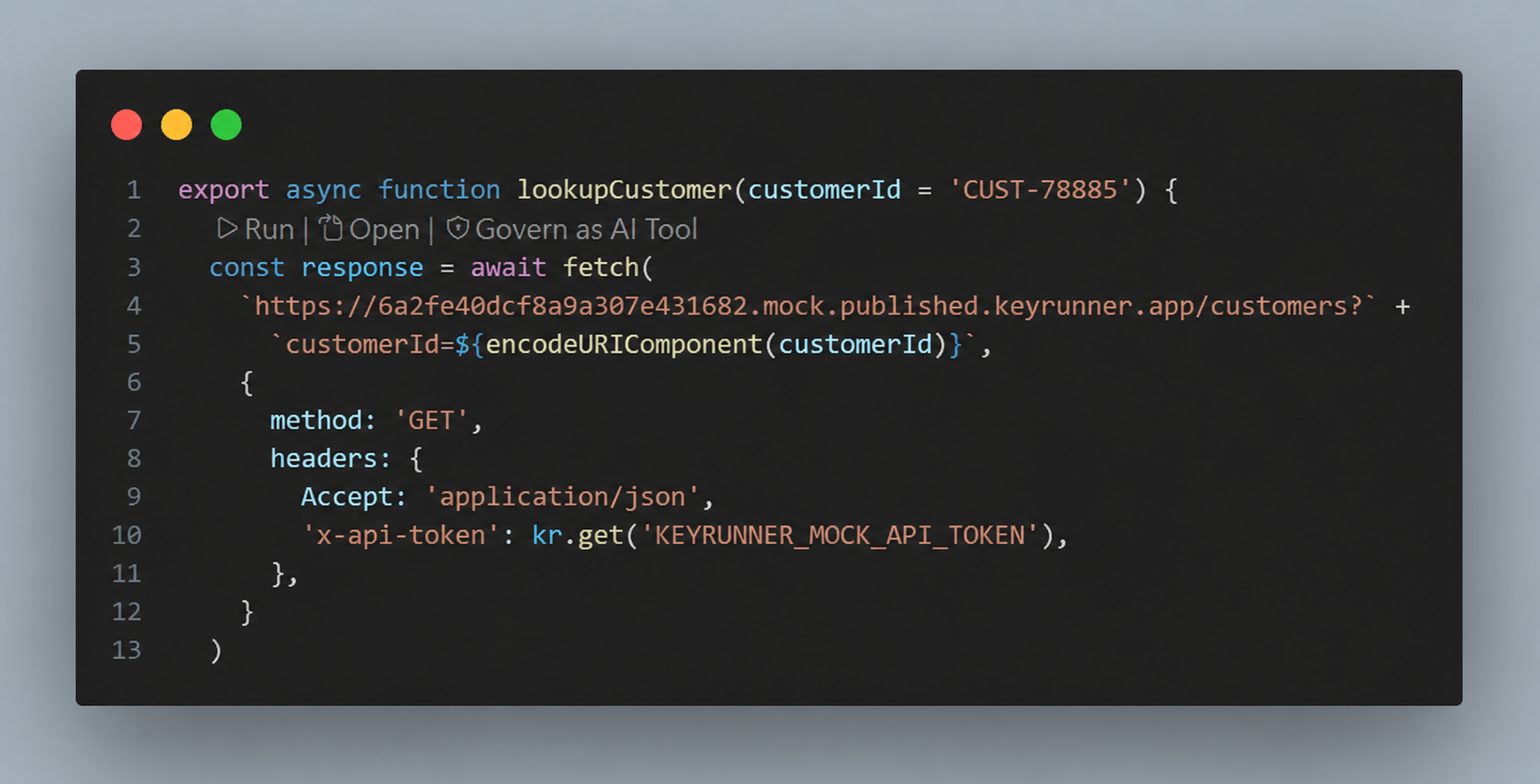
CodeLens actions
| Action | What it does |
|---|---|
| Run | Reviews the detected request and executes it through KeyRunner. Environment references and credentials remain under KeyRunner's execution controls. |
| Open | Opens the detected API call as an editable request in KeyRunner so you can inspect parameters, authorization, headers, body, scripts, tests, and the response. |
| Govern as AI Tool | Opens the AI-tool export workflow with the detected API contract prefilled. Describe the tool, choose which values the model supplies, and place the exported tool under a policy before assigning it to an agent. |
Supported API calls
CodeLens detection is available in JavaScript, TypeScript, JSX, and TSX files for supported HTTP calls such as fetch. Keep the request method, URL, headers, and body close to the call so KeyRunner can derive a useful request contract.
export async function lookupCustomer(customerId = 'CUST-78885') {
  return fetch(
    `https://api.example.com/customers?` +
      `customerId=${encodeURIComponent(customerId)}`,
    {
      method: 'GET',
      headers: {
        Accept: 'application/json',
        'x-api-token': kr.get('CUSTOMER_API_TOKEN'),
      },
    },
  )
}
Use environment values without exposing secrets
Keep environment-specific values and credentials in KeyRunner rather than hard-coding them in source. In the example, kr.get('CUSTOMER_API_TOKEN') represents a value resolved from the active KeyRunner environment when the request executes.
Before running the request:
- Open KeyRunner and select the correct project, workspace, and environment.
- Add the referenced variable to that environment.
- Mark credentials and tokens as sensitive.
- Use Run and review the resolved request before sending it.
KeyRunner masks sensitive values in the interface and keeps secret values out of the AI-tool definition.
From source code to a governed agent tool
- Place the cursor inside a supported API call.
- Select Run to verify the request and response.
- Select Open when the request needs additional configuration or testing.
- Select Govern as AI Tool after the request behaves correctly.
- Define the tool name, purpose, model-supplied parameters, timeout, and retry behavior.
- Add the exported tool to a KeyRunner policy.
- Assign the policy to an agent and inspect production calls in Agent Observability.
The result is a single developer workflow:
API in code → tested request → governed tool → production trace
Install the extension
Install KeyRunner - API & AI Tooling from the Visual Studio Marketplace. The same VSIX can be installed in Cursor.
After installing or updating:
- Run Developer: Reload Window from the Command Palette.
- Open a JavaScript or TypeScript file containing a supported API call.
- Wait for the KeyRunner actions to appear above the call.
If CodeLens actions do not appear
- Confirm the KeyRunner extension is enabled in the current editor profile.
- Reload the editor window after installing a new VSIX.
- Make sure Editor: Code Lens is enabled in VS Code or Cursor settings.
- Save the source file and keep the cursor inside the API call.
- Confirm the file language is JavaScript, TypeScript, JSX, or TSX.
- For complex wrapper functions or dynamically constructed requests, open KeyRunner and create the request manually.